

This guide explains how to integrate FedEx with Shipi to calculate live shipping rates, generate labels, and automate FedEx shipments.
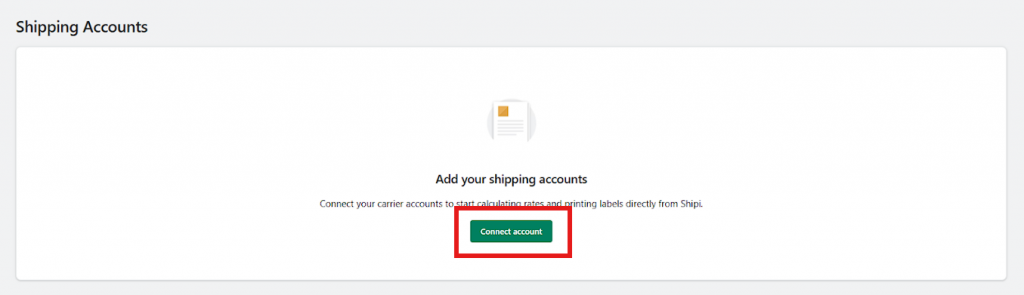
Go to Shipping Accounts
- Login to your Shipi dashboard
- Navigate to Carriers → Shipping Accounts
- Click Connect Account or Add Shipping Account
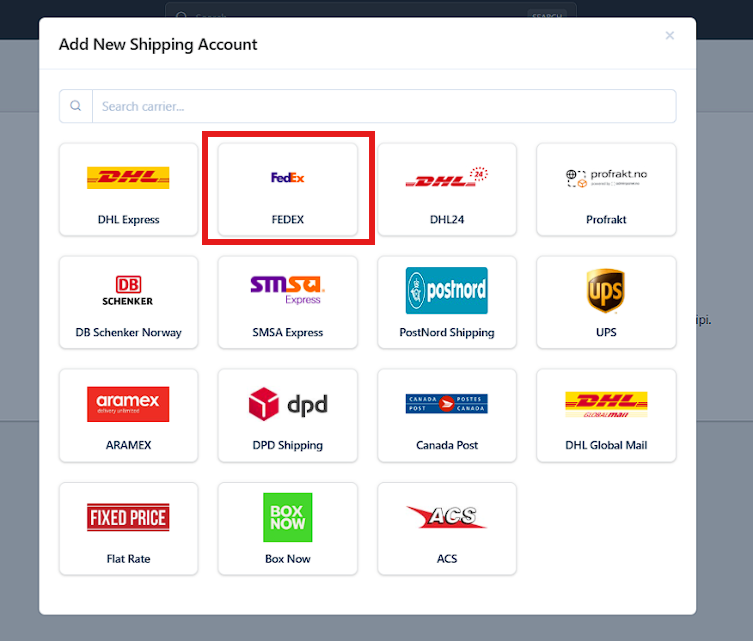
Select FedEx
- In the Add New Shipping Account popup:
- Search for FedEx, or
- Select FedEx from the carrier list
- Click on FedEx
Step 1: Enter FedEx Account Information
After selecting FedEx, you will see the FedEx configuration form.
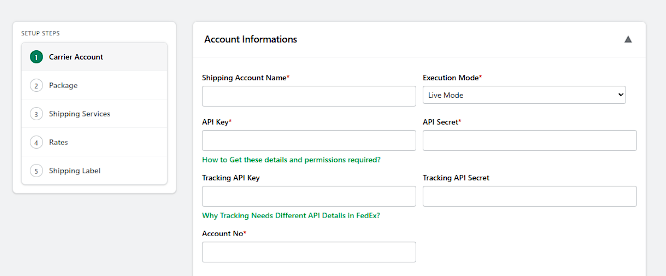
| Field Name | What It Is | Why It’s Required | Example / Notes |
|---|---|---|---|
| Shipping Account Name | Internal reference name for this FedEx account | Helps you identify the account inside Shipi | Example: FedEx – International, FedEx – Domestic |
| Execution Mode | Determines whether the account runs in test or live mode | Controls real vs test shipments | Live Mode → Real shipments (recommended)Test Mode → Testing only |
| API Key | FedEx API authentication key | Used to authenticate shipping requests | Generated from FedEx Developer Portal🔗 https://resources.myshipi.com/carriers/fedex/how-to-get-fedex-api-key-and-api-secret/ |
| API Secret | Secret paired with API Key | Ensures secure communication with FedEx | Must match the API Key |
| Tracking API Key | API key used only for tracking updates | FedEx uses separate APIs for shipping & tracking | Required for shipment tracking🔗 https://resources.myshipi.com/carriers/fedex/why-fedex-tracking-needs-different-api-details/ |
| Tracking API Secret | Secret for tracking API authentication | Secures tracking-related requests | Must match Tracking API Key |
| Account Number | Your official FedEx shipping account number | Required for rate calculation & label generation | Provided by FedEx |
Once the account integration setup is completed we need below settings to control how FedEx handles your shipments.
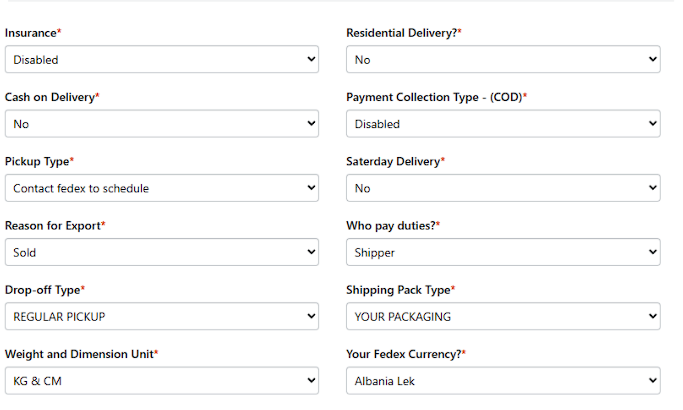
🔹 Insurance
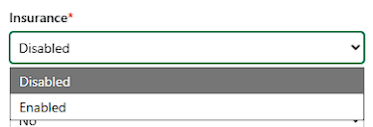
| Option | What it Means | When to Use |
|---|---|---|
| Disabled | No shipment insurance applied | Default option for most shipments |
| Enabled | FedEx insurance is applied | Use for high-value or fragile shipments |
📌 Enable only if you need insured shipments.
🔹 Residential Delivery
| Option | What it Means | Notes |
|---|---|---|
| Yes | Delivery to a residential address | May increase shipping cost |
| No | Delivery to a commercial/business address | Faster & cheaper in many cases |
🔹 Cash on Delivery (COD)
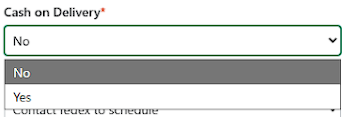
| Option | Meaning |
|---|---|
| Yes | FedEx will collect payment at delivery |
| No | No payment collection at delivery |
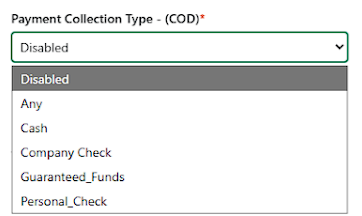
🔹 Payment Collection Type (COD)
| Option | What it Means | When to Use | Recommendation |
|---|---|---|---|
| Disabled | No payment collected by FedEx | Prepaid orders, online payments | ✅ Recommended |
| Cash | Physical cash collected at delivery | COD eCommerce orders | ⚠️ Use carefully |
| Company Check | Company-issued cheque | B2B shipments | ❌ Not for normal stores |
| Guaranteed Funds | Certified / bank-guaranteed payment | High-value B2B shipments | ⚠️ Rare |
| Personal Check | Personal cheque from customer | Trusted repeat customers only | 🚫 Not recommended |
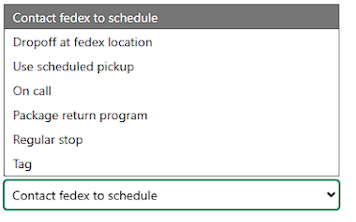
🔹 Pickup Type
| Option | What it Means | When to Use |
|---|---|---|
| Contact FedEx to Schedule | You must call FedEx every time | Occasional shipping |
| Drop-off at FedEx Location | You take packages to FedEx | Low volume shipping |
| Use Scheduled Pickup | FedEx picks up at fixed time | Daily shipping ✅ |
| On Call | Pickup requested on demand | Irregular shipping |
| Regular Stop | FedEx stops as part of route | Warehouses / high volume |
| Package Return Program | Used only for returns | Reverse logistics |
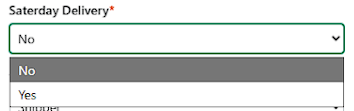
🔹 Saturday Delivery
| Option | What it Means | Notes |
|---|---|---|
| Yes | Saturday delivery allowed | Higher cost |
| No | Weekday delivery only | Default |
🔹 Reason for Export
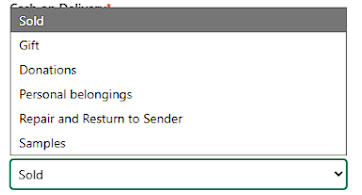
Used for international shipments:
| Option | When to Use |
|---|---|
| Sold | Products sold to a customer (most eCommerce orders) ✅ |
| Gift | Personal gifts (non-commercial) |
| Donations | Charity or free donations |
| Personal Belongings | Moving personal items |
| Repair and Return to Sender | Items sent for repair |
| Samples | Free product samples |
📌 Required for customs documentation.
🔹 Who Pays Duties
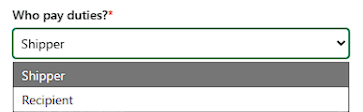
| Option | Meaning |
|---|---|
| Shipper | You (merchant) pay duties |
| Recipient | Customer pays duties |
📌 Important for international shipments.
🔹 Drop-off Type
| Option | Meaning |
|---|---|
| REGULAR PICKUP | FedEx picks up regularly from your location ✅ |
| REQUEST COURIER | One-time pickup request |
| DROP BOX | You drop package at FedEx drop box |
| BUSINESS SERVICE CENTER | You drop at FedEx office |
| STATION | Drop at FedEx station |
🔹 Shipping Pack Type
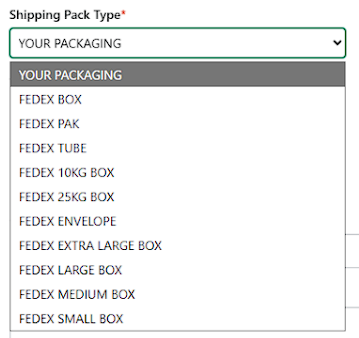
| Option | When to Use |
|---|---|
| YOUR PACKAGING | You use your own box (most merchants) ✅ |
| FEDEX BOX | FedEx-provided box |
| FEDEX PAK | FedEx envelope |
| FEDEX TUBE | Tube packaging |
| FEDEX 10KG / 25KG BOX | Fixed-weight FedEx boxes |
| FEDEX ENVELOPE | Documents |
| FEDEX SMALL / MEDIUM / LARGE BOX | FedEx boxes |
📌 Choose based on how you pack orders.
🔹 Weight & Dimension Unit
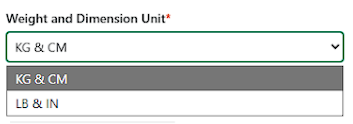
| Option | Use When |
|---|---|
| KG & CM | Metric system (most countries) ✅ |
| LB & IN | US / Imperial system |
📌 Must match your store configuration.
🔹 FedEx Currency
- Select your billing currency
- Example: USD, EUR, INR, etc.
Shipper Address (Ship From Address)
The Shipper Address defines where FedEx will pick up the shipment and what appears as the sender address on labels and customs documents.
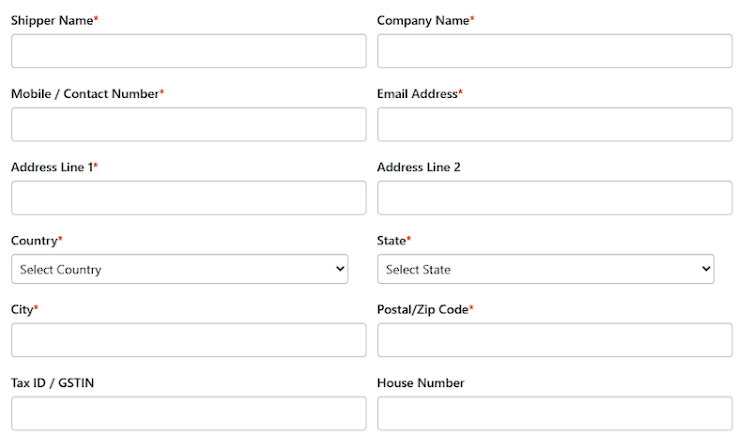
Shipper Address Fields Explained
| Field | Description | Notes |
|---|---|---|
| Shipper Name | Contact person name | Required |
| Company Name | Business or store name | Appears on label |
| Mobile / Contact Number | FedEx pickup contact number | Must be reachable |
| Email Address | Shipment-related communication | Required |
| Address Line 1 | Primary pickup address | Required |
| Address Line 2 | Optional extra address info | Optional |
| Country | Pickup country | Must match FedEx account |
| State | Pickup state | Required |
| City | Pickup city | Required |
| Postal / Zip Code | Area postal code | Very important |
| Tax ID / GSTIN | Tax identifier | Required for some countries |
| House Number | House / building number | Optional |
📘 Address Book (Recommended)
Shipi allows you to save multiple ship-from addresses using the Address Book.
Use this when:
- You ship from multiple warehouses
- You have dropshipping locations
- You want to switch pickup locations easily
👉 Note:
Address Book setup will be covered in a separate dedicated document.
Link this section to:
“How to Manage Ship-From Addresses in Shipi”
Step 2: Package Configuration (Important)
FedEx shipping rates and label generation depend heavily on how your products are packed.
Before continuing, we strongly recommend configuring your Package Settings correctly.
👉 Read this guide:
How Package Configuration Works in Shipi
(Explains individual packing, weight-based packing, boxes, and real examples)
📌 Incorrect package configuration may cause:
- wrong shipping rates
- label failures
- carrier rejections
Step 3: Shipping Services (Very Important)
Shipping services define HOW FAST and HOW FedEx delivers the shipment.
Users must select at least one service to get rates.
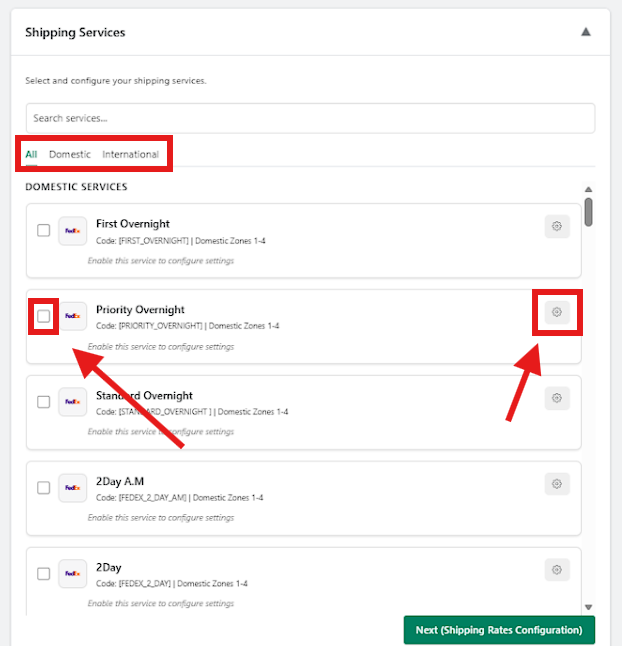
Shipi categorizes services as:
- Domestic
- International
- Additional / Special Services
Domestic FedEx Services
| Service Name | What It Is | Typical Use Case | Good for eCommerce |
|---|---|---|---|
| First Overnight | Early morning next-day delivery | Urgent documents / medical | ⚠️ |
| Priority Overnight | Next business morning delivery | High-priority orders | ⚠️ |
| Standard Overnight | Next business day delivery | Overnight at lower cost | ⚠️ |
| 2Day A.M | Delivery by second-day morning | Faster but cheaper than overnight | ⚠️ |
| 2Day | Delivery in 2 business days | Fast & balanced delivery | ✅ |
| Express Saver | Delivery in ~3 business days | Cost-optimized express | ✅ |
| Ground | 1–5 business days | Heavy / non-urgent shipments | ✅ |
| Ground Home Delivery | Ground delivery to residences | B2C residential orders | ✅ |
| Same Day | Same-day delivery | Emergency shipments | ❌ |
| Same Day City | Same-day within city | Local emergency | ❌ |
| Same Day Metro Morning | Morning metro delivery | Time-critical | ❌ |
| Same Day Metro Afternoon | Afternoon metro delivery | Time-critical | ❌ |
| Same Day Metro Rush | Immediate metro delivery | Ultra-urgent | ❌ |
| SmartPost | FedEx + postal hybrid | Low-cost lightweight delivery | ⚠️ |
| Distance Deferred | Deferred long-distance delivery | Specialized routing | ❌ |
Domestic Freight Services (Heavy Shipments)
| Service Name | What It Is | Use Case | Good for eCommerce |
|---|---|---|---|
| 1 Day Freight | Next-day freight | Heavy urgent goods | ⚠️ |
| 2 Day Freight | Freight in 2 days | Heavy shipments | ⚠️ |
| 3 Day Freight | Freight in 3 days | Cost-controlled freight | ⚠️ |
| First Freight | Earliest freight delivery | Critical freight | ❌ |
| Freight Economy | Slower freight | Lowest freight cost | ⚠️ |
| Freight Priority | Faster freight | Time-critical freight | ⚠️ |
| Next Day Freight | Overnight freight | Urgent pallets | ❌ |
📌 Enable freight services ONLY if you ship pallets or >68kg items
Regional FedEx Services (Advanced / Enterprise)
| Service Name | Description | Use Case | Good for eCommerce |
|---|---|---|---|
| Regional Economy | Low-cost regional delivery | Enterprise distribution | ❌ |
| Regional Economy Distribution | Bulk regional distribution | B2B logistics | ❌ |
| Regional First | Fast regional | Enterprise | ❌ |
| Regional Ground | Ground regional | Regional networks | ❌ |
| Regional Priority | Fast regional | Enterprise | ❌ |
| Regional Priority Distribution | Priority distribution | Enterprise | ❌ |
| Regional Priority Express | Express regional | Enterprise | ❌ |
| Regional Priority Plus | Premium regional | Enterprise | ❌ |
| Regional Economy Freight | Regional freight | Enterprise freight | ❌ |
| Regional Priority Freight | Fast regional freight | Enterprise freight | ❌ |
🚫 Most Shipi users should NOT enable regional services
International FedEx Services
| Service Name | What It Is | Use Case | Good for eCommerce |
|---|---|---|---|
| International Priority | Fast international delivery | High-value exports | ✅ |
| International Economy | Slower, cheaper international | Cost-saving exports | ✅ |
| International First | Earliest delivery worldwide | Urgent documents | ⚠️ |
| International Ground | Cross-border ground | Border countries | ⚠️ |
| International Priority Express | Premium express | Urgent exports | ⚠️ |
| International Connect Plus | eCommerce-focused service | Lightweight parcels | ✅ |
| Europe First International Priority | Europe early delivery | EU-specific | ⚠️ |
| International Economy Freight | Heavy international freight | Pallet shipments | ⚠️ |
| International Priority Freight | Fast freight export | Heavy urgent | ⚠️ |
| International Distribution Freight | Distribution freight | Enterprise | ❌ |
Cargo & Custom Critical Services (DO NOT ENABLE)
| Service Name | Description | Recommended |
|---|---|---|
| Cargo Airport to Airport | Airport-only cargo | ❌ |
| Cargo Freight Forwarding | Forwarding service | ❌ |
| Cargo Mail / Registered Mail | Postal cargo | ❌ |
| Cargo Surface Mail | Surface cargo | ❌ |
| Custom Critical (All types) | Life-critical / charter | ❌ |
| White Glove Services | Special handling | ❌ |
| Transborder Distribution Consolidation | Cross-border consolidation | ❌ |
🚫 Enable only if FedEx explicitly instructs you
Service Configuration (Right-Side Config Box)
For each enabled service, Shipi allows customization.
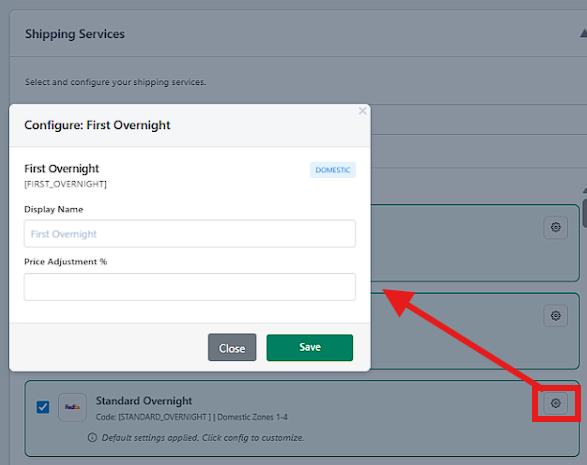
Available Options
| Option | What It Does |
|---|---|
| Display Name | Rename service for customers |
| Price Adjustment (%) | Increase or decrease FedEx rate |
📌 Examples:
+10%→ Add margin-5%→ Offer discount
Step 4: Shipping Rates – Additional Configuration
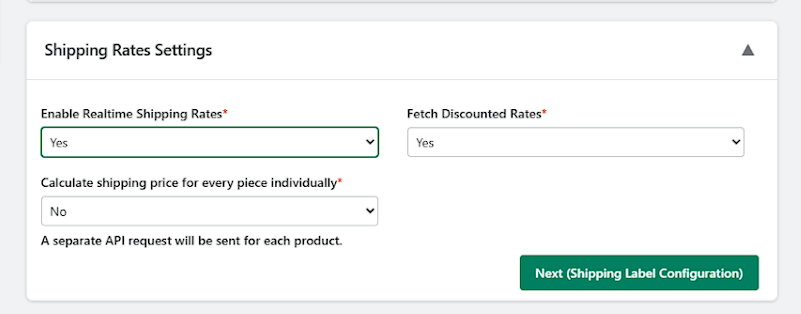
🔹 Enable Realtime Shipping Rates
Controls whether Shipi fetches live shipping prices from FedEx.
| Option | What This Means | When to Use | Impact on Store | Recommended |
|---|---|---|---|---|
| Yes | Shipi fetches live rates from FedEx API | Almost all merchants | Accurate prices at checkout & admin | ✅ Yes |
| No | Live rates are disabled | Only if using flat/manual rates | No live pricing, checkout shipping may fail | ❌ No |
📌 Merchant Tip:
If this is set to No, FedEx rates will not work properly.
🔹 Fetch Discounted Rates
Controls whether your FedEx-negotiated rates are applied.
| Option | What This Means | When to Use | Pricing Impact | Recommended |
|---|---|---|---|---|
| Yes | Uses discounted rates from your FedEx account | If FedEx gave you special pricing | Lower shipping costs | ✅ Yes |
| No | Uses standard FedEx retail rates | If no discounts available | Higher shipping cost | ⚠️ Only if needed |
📌 Merchant Tip:
Always select Yes unless FedEx specifically says otherwise.
🔹 Calculate Shipping Price for Every Piece Individually
Controls how Shipi calculates shipping cost for multi-item orders.
| Option | What This Means | When to Use | Performance Impact | Recommended |
|---|---|---|---|---|
| No | All items shipped as one package | Normal eCommerce orders | Fast & simple | ✅ Yes |
| Yes | Each item priced separately | Multi-box or split shipments | Slower, more API calls | ⚠️ Advanced only |
📌 Merchant Tip:
Keep this No unless items ship separately.
Step 5: Shipping Label Settings
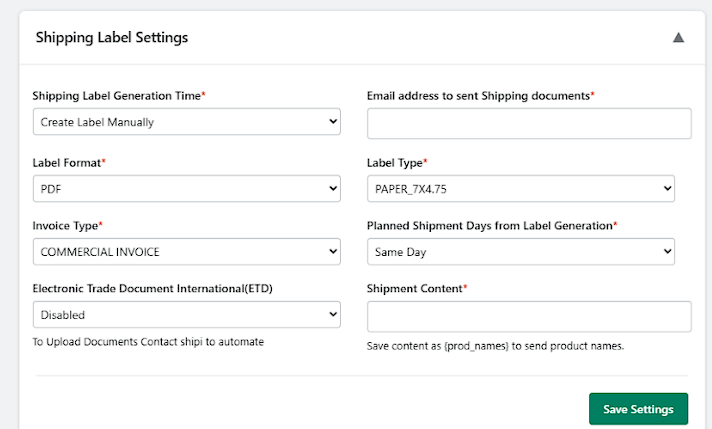
🔹 Shipping Label Generation Time
Controls when Shipi generates the FedEx shipping label.
| Option | What This Means | When to Use | Risk / Impact | Recommended |
|---|---|---|---|---|
| Create Label Manually | Label is created only when you click generate | Most merchants | Prevents wrong labels | ✅ Yes |
| Create Label immediately once order placed | Label auto-created on order creation | Fully automated flows | Risk of address/weight errors | Advanced – Works fine. |
📌 Merchant Tip:
Manual creation avoids wasted labels and FedEx billing issues.
🔹 Email Address to Send Shipping Documents
Controls where FedEx documents are emailed.
| Value | What This Means | When to Use | Recommended |
|---|---|---|---|
| Admin / Ops Email | Labels, invoices & docs sent here | Normal operations | ✅ Yes |
| Empty | No email sent | Not recommended | ❌ No |
📌 Merchant Tip:
Use a shared operations email (e.g. shipping@yourstore.com).
🔹 Label Format
Controls the file format of the shipping label.
| Option | What This Means | Printer Compatibility | Recommended |
|---|---|---|---|
| Standard printable PDF file | All printers | ✅ Yes | |
| Image (PNG/ZPL if available) | Raw printer formats | Advanced setups | ⚠️ Only if needed |
📌 Merchant Tip:
PDF works everywhere and is easiest to manage.
🔹 Label Type
Controls label paper size / stock.
| Option | What This Means | Printer Type | Recommended |
|---|---|---|---|
| PAPER_7X4.75 | Standard FedEx thermal label | Thermal printers | ✅ Yes |
| PAPER_4X6 | Smaller thermal label | Thermal printers | ⚠️ |
| PAPER_4X8 / 4X9 | Large label | Special printers | ❌ |
| PAPER_8.5X11 | Full-page label | Office printers | ⚠️ |
| STOCK_* | FedEx stock formats | FedEx printers only | ❌ |
📌 Merchant Tip:
Use PAPER_7X4.75 unless FedEx specifies otherwise.
🔹 Invoice Type
Defines which invoice FedEx attaches (important for customs).
| Option | What This Means | When to Use | Recommended |
|---|---|---|---|
| Commercial Invoice | Invoice for sold goods | International eCommerce | ✅ Yes |
| Proforma Invoice | Estimated invoice | Samples / gifts | ⚠️ Rare |
📌 Merchant Tip:
Always use Commercial Invoice for paid orders.
🔹 Planned Shipment Days from Label Generation
Controls when the shipment is expected to be picked up, relative to label creation.
| Option | What This Means | When to Use | Recommended |
|---|---|---|---|
| Same Day | Pickup on label creation day | Normal shipping | ✅ Yes |
| +1 Day | Pickup next day | Delayed dispatch | ⚠️ |
| +2 / +3 Day | Pickup later | Pre-created labels | ❌ |
📌 Merchant Tip:
Use Same Day to avoid pickup mismatches.
🔹 Electronic Trade Document – International (ETD)
Controls digital upload of customs documents to FedEx.
| Option | What This Means | When to Use | Recommended |
|---|---|---|---|
| Disabled | Paper documents used | Most merchants | ✅ Yes |
| Enabled | Digital customs documents | Advanced FedEx setup | ⚠️ Only if approved |
📌 Merchant Tip:
Enable ETD only after FedEx confirms your account supports it.
🔹 Shipment Content
Defines what shipment description is sent to FedEx & customs.
| Value | What This Means | When to Use | Recommended |
|---|---|---|---|
{prod_names} | Sends product names dynamically | Normal eCommerce | ✅ Yes |
| Custom text | Fixed description | Documents / samples | ⚠️ |
📌 Merchant Tip:{prod_names} helps with customs clarity and compliance.
Common FedEx Setup Issues
You can contact us anytime for any issues that you are facing. The common issues listed below
Rates not showing
- Check account number
- Verify API credentials
- Ensure execution mode is Live
Label generation failed
- Invalid address
- Missing weight/dimensions
- Unsupported service for destination
Tracking not updating
- Tracking API key/secret missing
- Shipment not picked up yet
Summary
With FedEx integrated in Shipi, you can:
- Calculate live FedEx shipping rates
- Generate shipping labels instantly
- Automate domestic & international shipments
- Track shipments automatically