

This guide explains how to integrate DHL24 with Shipi to calculate live shipping rates, generate labels, and automate DHL24 shipments.
Go to Shipping Accounts
- Login to your Shipi dashboard
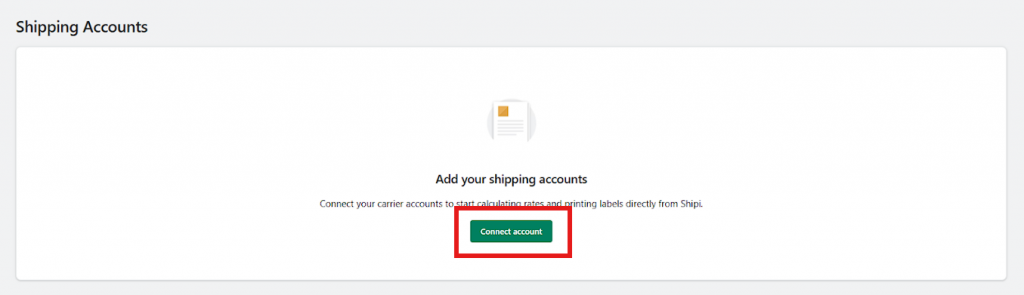
- Navigate to Carriers → Shipping Accounts
- Click Connect Account or Add Shipping Account
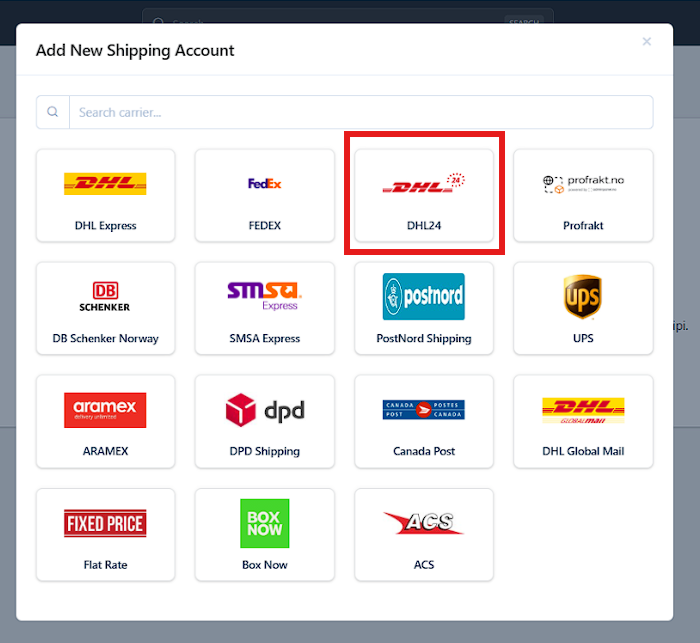
Select DHL24
- In the Add New Shipping Account popup:
- Search for DHL24, or
- Select DHL24 from the carrier list
- Click on DHL24
Step 1: DHL24 Account Information
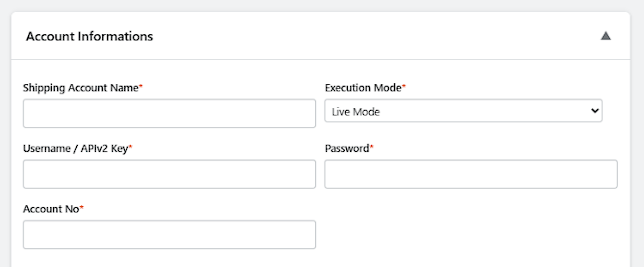
This section connects your DHL24 account with Shipi.
🔹 Shipping Account Name
| Field | Description |
|---|---|
| What this is | Internal name for your DHL24 account |
| Example | DHL24 – Domestic EU |
| Who sees this | Only you (Shipi dashboard) |
📌 Helps when managing multiple DHL accounts.
🔹 Execution Mode
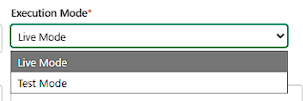
| Option | What It Means | When to Use |
|---|---|---|
| Live Mode | Real shipments & billing | ✅ Production |
| Test Mode | Testing only | Sandbox |
📌 Always use Live Mode for real orders.
🔹 Username / APIv2 Key
| Field | Description |
|---|---|
| What this is | DHL24 API username / API v2 key |
| Used for | Authentication with DHL24 |
📌 Provided by DHL24 when your account is activated.
🔹 Password
| Field | Description |
|---|---|
| What this is | Password linked to DHL24 API |
| Used for | Secure API communication |
⚠️ Keep this confidential.
🔹 Account Number
| Field | Description |
|---|---|
| What this is | Your DHL24 billing account number |
| Used for | Rate calculation & label creation |
🚫 Without this, shipping will failed.
Shipper Address (Ship From Address)
The Shipper Address defines where DHL24 will pick up the shipment and what appears as the sender address on labels and customs documents.
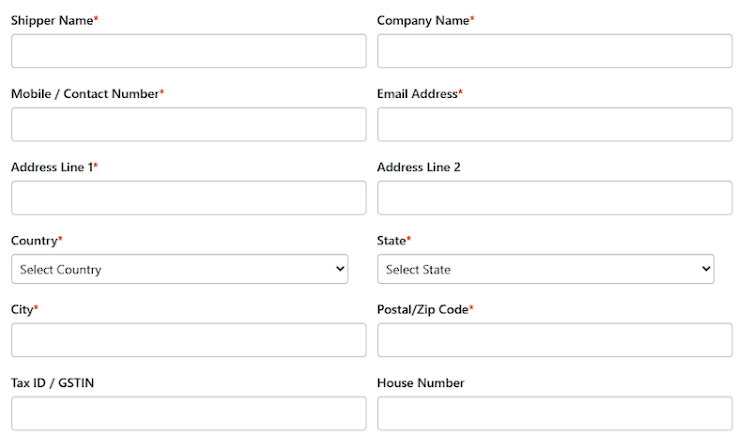
Shipper Address Fields Explained
| Field | Description | Notes |
|---|---|---|
| Shipper Name | Contact person name | Required |
| Company Name | Business or store name | Appears on label |
| Mobile / Contact Number | DHL24 pickup contact number | Must be reachable |
| Email Address | Shipment-related communication | Required |
| Address Line 1 | Primary pickup address | Required |
| Address Line 2 | Optional extra address info | Optional |
| Country | Pickup country | Must match DHL24 account |
| State | Pickup state | Required |
| City | Pickup city | Required |
| Postal / Zip Code | Area postal code | Very important |
| Tax ID / GSTIN | Tax identifier | Required for some countries |
| House Number | House / building number | Optional |
📘 Address Book (Recommended)
Shipi allows you to save multiple ship-from addresses using the Address Book.
Use this when:
- You ship from multiple warehouses
- You have dropshipping locations
- You want to switch pickup locations easily
👉 Note:
Address Book setup will be covered in a separate dedicated document.
Link this section to:
“How to Manage Ship-From Addresses in Shipi”
Step 2: Package Configuration (Important)
DHL24 shipping rates and label generation depend heavily on how your products are packed.
Before continuing, we strongly recommend configuring your Package Settings correctly.
👉 Read this guide:
How Package Configuration Works in Shipi
(Explains individual packing, weight-based packing, boxes, and real examples)
📌 Incorrect package configuration may cause: carrier rejections, wrong shipping rates, label failures
Step 3: DHL24 Shipping Services
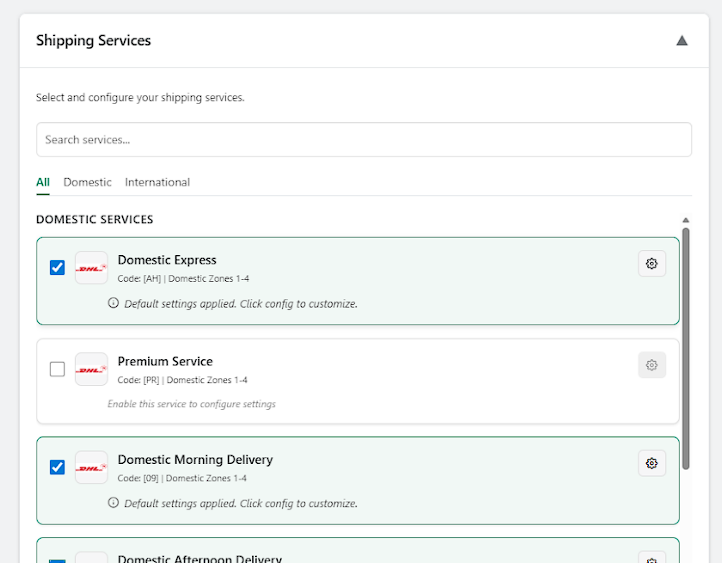
Select the services you want to offer customers.
🔹 DHL24 Available Services
| Code | Service Name | Type | What It Is | Best For |
|---|---|---|---|---|
| AH | Domestic Express | Domestic | Fast domestic delivery | eCommerce |
| PR | Premium Service | Domestic | Priority handling | High-value |
| 09 | Domestic Morning Delivery | Domestic | Delivery before morning | Urgent |
| 12 | Domestic Afternoon Delivery | Domestic | Delivery by afternoon | Regular |
| DW | Domestic Evening Delivery | Domestic | Evening delivery | B2C |
| EK | International Express | International | Fast international | Cross-border |
| CP | International Plus | International | Cost-optimized intl | SMB |
| CM | International Pallet | International | Pallet shipments | B2B |
| LM | Delivery to SP Point | International | Pickup point delivery | EU eCommerce |
Service Configuration (Right-Side Config Box)
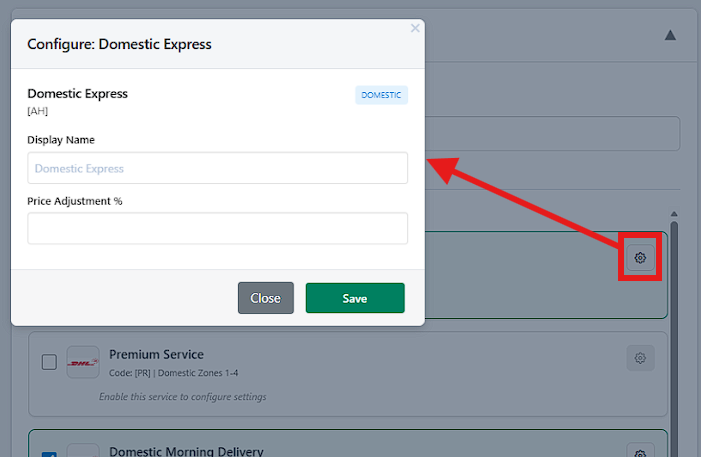
For each enabled service, Shipi allows customization.
Available Options
| Option | What It Does |
|---|---|
| Display Name | Rename service for customers |
| Price Adjustment (%) | Increase or decrease DHL24 rate |
📌 Examples:
+10%→ Add margin-5%→ Offer discount
🔹 Which DHL24 Services Are Best for eCommerce?
✅ Recommended for most Shipi merchants
- Domestic Express (AH)
- Domestic Afternoon Delivery (12)
- International Express (EK)
- International Plus (CP)
- Delivery to SP Point (LM)
🚫 Not for normal eCommerce
- Pallet services (CM) unless B2B
💰 Step 4: Shipping Rates Settings
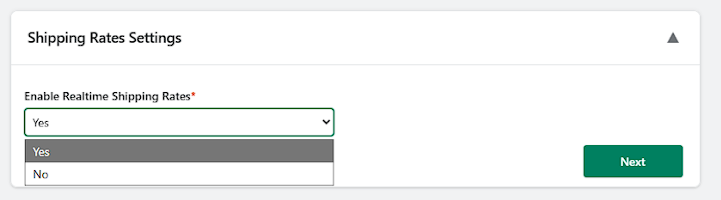
🔹 Enable Realtime Shipping Rates
| Option | Meaning | Recommendation |
|---|---|---|
| Yes | Fetch live DHL24 rates | ✅ Required |
| No | Disable live rates | 🚫 Not recommended |
🏷️ Step 5: Shipping Label Settings (DHL24)
🔹 Shipping Label Generation Time
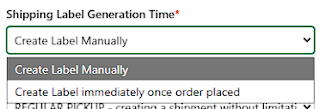
| Option | Meaning | Use Case |
|---|---|---|
| Create Label Manually | Generate when ready | ✅ Best |
| Auto create on order | Immediate label | Automated flows |
🔹 Send Shipping Label to Email Address
| Field | Description |
|---|---|
| What this does | Emails label PDF |
| Leave empty | No email sent |
📌 Optional.
🔹 Drop-off Type
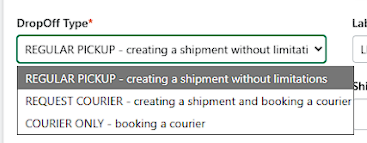
| Option | Meaning | When to Use |
|---|---|---|
| REGULAR PICKUP | Shipment without booking | ✅ Default |
| REQUEST COURIER | Book pickup with shipment | If needed |
| COURIER ONLY | Pickup without shipment | Rare |
🔹 Label Type
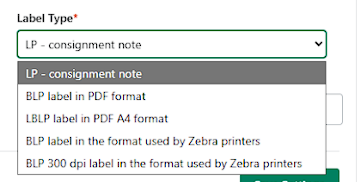
| Option | Meaning |
|---|---|
| LP – consignment note | Standard DHL24 label |
| BLP PDF | PDF label |
| BLP PDF A4 | A4 format |
| Zebra formats | Zebra printers |
✅ Recommended: LP – consignment note
🔹 Planned Shipment Days from Label Generation
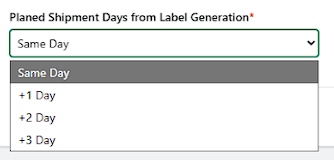
| Option | Meaning |
|---|---|
| Same Day | Ship today |
| +1 / +2 / +3 Day | Delayed shipping |
🔹 Shipment Content
| Value | Meaning |
|---|---|
{prod_names} | Sends product names |
| Custom text | Static description |
📌 Use {prod_names} for customs clarity.
✅ Recommended DHL24 Configuration (Quick Summary)
| Setting | Value |
|---|---|
| Execution Mode | Live |
| Realtime Rates | Enabled |
| Label Generation | Manual |
| Label Type | LP – consignment note |
| Shipment Day | Same Day |
| Key Services | AH, 12, EK, CP |
🚨 Common Merchant Mistakes (Avoid These)
❌ Wrong account number
❌ Incorrect ship-from postal code
❌ Enabling unused services
❌ Auto-label for unpaid orders
If required support – contact us on below link – https://myshipi.com/support